On-Premise Enterprise Automation
No-code automation. On-premise by design.
Design, orchestrate, and execute business automation entirely within your own infrastructure, without writing code.
- 100% On-Premise
- Data Sovereignty
- Enterprise Security
Why Exekra
Why organizations choose Exekra
Exekra enables organizations to design, orchestrate, and execute automation entirely within their own infrastructure.
Unlike cloud-first automation platforms, workflows, data, credentials, and execution remain under your control.
Built for organizations where data sovereignty, infrastructure control, and predictable automation costs are non-negotiable.
Data Sovereignty by Design
Your data stays inside your firewall. No cloud dependency, no foreign data residency, no compliance loopholes.
Built for regulated sectors where data sovereignty isn't optional.
Transparent Enterprise Licensing
Predictable pricing designed for growing organizations.
Scale developers, attended users, and automation capacity independently without hidden fees or unexpected costs.
No-Code for Business Teams
Drag, drop, deploy. Your operations team builds workflows without waiting on engineers, scripts, or developer queues.
Visual builder with conditions, loops, and error handling built in.
Features
Everything required to automate at scale
Build workflows visually. Run them on your own servers. Track every execution.
100% On-Premise
Runs entirely inside your network. No cloud dependencies, no shared tenancy. Your data, your servers, your control.
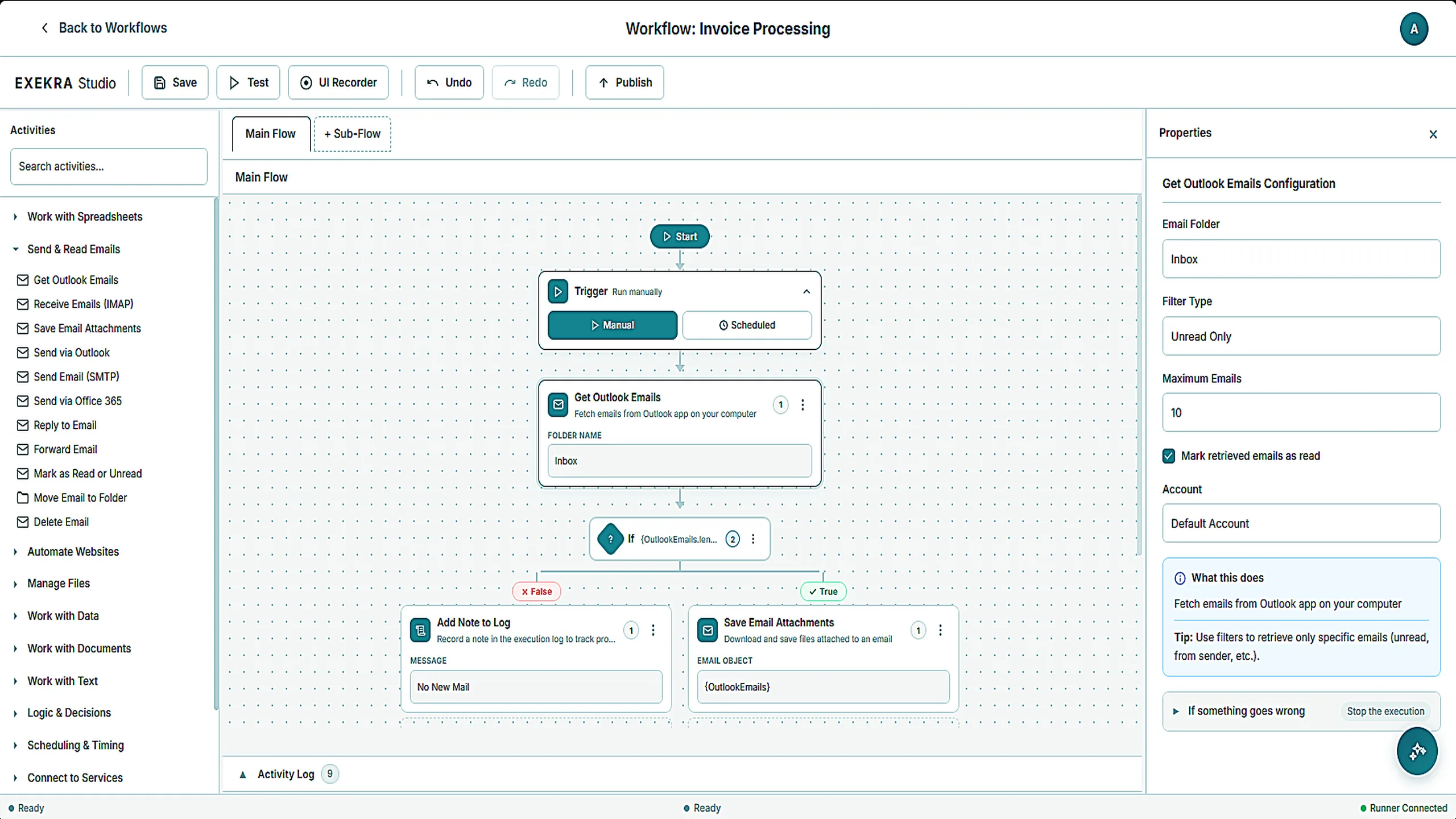
Exekra Studio
Business teams design automations on a drag-and-drop canvas. Conditions, loops, and error handling, with no code and no engineering tickets.
Enterprise Security
Role-based access control, encrypted credentials, and a complete audit trail of every workflow execution.
Reliable Execution
Lightweight runners execute workflows on Windows machines. They keep working when the network drops and sync when it returns.
Workflow Scheduling
Run work on a schedule, on a trigger, or on demand. Recurring processes start on time without anyone remembering to launch them.
Full Audit Trail
Every workflow execution is logged and timestamped. Real-time dashboards show what's running, what's waiting, and what failed.
Architecture
Architected for full on-premise control
Four layers, each running inside your network. No external dependencies on the execution path, no shared tenancy, no data crossing your firewall.
Exekra Studio
Visual workflow designer for business teams. Authors publish to Hub over TLS without leaving your network.
Exekra Hub
On-premise orchestrator with role-based access, scheduling, credential vault, and a complete audit trail.
Exekra Runners
Lightweight Windows agents that execute workflows on your machines. Resilient to network drops, bound to Hub by signed credentials.
Encrypted Data Layer
PostgreSQL inside your firewall. Workflow definitions, credentials, audit logs, and execution state never leave your infrastructure.
Exekra Studio
Design powerful workflows visually
Build enterprise automations without writing a single line of code. Our visual builder makes it easy for anyone to create, test, and deploy workflows.
Drag & Drop Studio
Build workflows visually by dragging actions, conditions, and triggers onto the canvas.
Conditional Logic
Add branching paths, loops, and error handlers to create sophisticated automation flows.
Reusable Templates
Save common patterns as templates and share them across your organization.
Extensive Built-In Actions
Connect to browsers, files, databases, APIs, email, and desktop applications out of the box.
How It Works
Built for enterprise control at every step
From design through scale, every step runs inside your infrastructure under your governance.
- Step 01
Design Visually, No Code Required
Business teams build automations on a drag-and-drop canvas. Conditions, loops, and error handling without engineering tickets.
- Step 02
Deploy Inside Your Network
Runners execute on your own Windows machines. Workflows, data, and credentials never leave your infrastructure.
- Step 03
Govern Every Execution
Role-based access, encrypted credentials, and a complete audit trail of every run. Scheduled, triggered, or on demand.
- Step 04
Scale Predictably
Add runners and seats independently as automation grows. Capacity expands with transparent licensing, no surprise overages.
Benefits
Why teams choose Exekra
Practical automation that solves real problems, starting with your first workflow.
Reclaim hours every week
Free your team from repetitive manual tasks. Workflows run automatically, letting people focus on high-value work.
Your data stays yours
Everything runs on-premise within your infrastructure. No cloud dependencies, no data leaving your network.
No developer bottleneck
Business teams build and maintain their own automations. IT sets the guardrails, operations teams drive adoption.
Scale without rearchitecting
Start with one runner, grow to many. Add capacity by deploying more runners. No infrastructure changes needed.
Complete visibility
Every execution is logged, every action auditable. Real-time dashboards show exactly what's running and where.
Reduce error rates
Automated workflows follow the same steps every time. Eliminate typos, missed steps, and inconsistent processes.
Use Cases
Built for real operational workflows
Common enterprise automation use cases across operations, finance, compliance, and IT. Each runs entirely inside your infrastructure, with full audit and governance.
Invoice Processing
Extract, validate, and route invoices from inboxes and shared folders into your finance system.
Faster month-end close with fewer manual errors.
Employee Onboarding
Provision accounts, request equipment, and trigger HR workflows the moment a new hire is confirmed.
Day-one readiness across HR, IT, and operations.
Customer Onboarding
Move new accounts through KYC, contract setup, and system provisioning without manual handoffs.
Shorter time-to-revenue on every new customer.
Compliance Workflows
Enforce approvals, evidence collection, and audit trails for regulatory and internal control processes.
Provable compliance with a defensible audit record.
Document Routing
Classify incoming documents, extract key fields, and route them to the right team or system.
Lower processing cost and shorter response times.
Service Request Management
Triage, route, and resolve internal service requests across IT, HR, and shared services teams.
Lower handling cost and shorter resolution times.
Pricing
Predictable pricing built for enterprise budgets
Pricing scales with your automation capacity, not your task volume. Built for finance and procurement teams that need a defensible budget.
- No per-task fees or surprise overage charges
- Transparent annual contracts with volume discounts
- A defensible, predictable automation budget
developer
Builders who design automations visually in Studio.
attended
People who run attended automations on demand.
unattended
Unattended execution capacity across your machines.
Bring enterprise automation in-house
See Exekra deployed inside your infrastructure. We will walk through your environment, your security posture, and the workflows that matter most.